// for cyclists who report bad driving

Caught it on camera.
Now make it count.

Report-It turns dash cam footage and your ride data into a police-ready report in minutes. It finds the moment, reads the plate, pins the location, drafts the statement and files it to Thames Valley Police. One app, one evening saved.

Free during early access. One email when your invite is ready, nothing else.

  • Minutesfrom SD card to filed report
  • 90+portal fields autofilled
  • ±60sevidence clip cut for you
Report-It — ride review
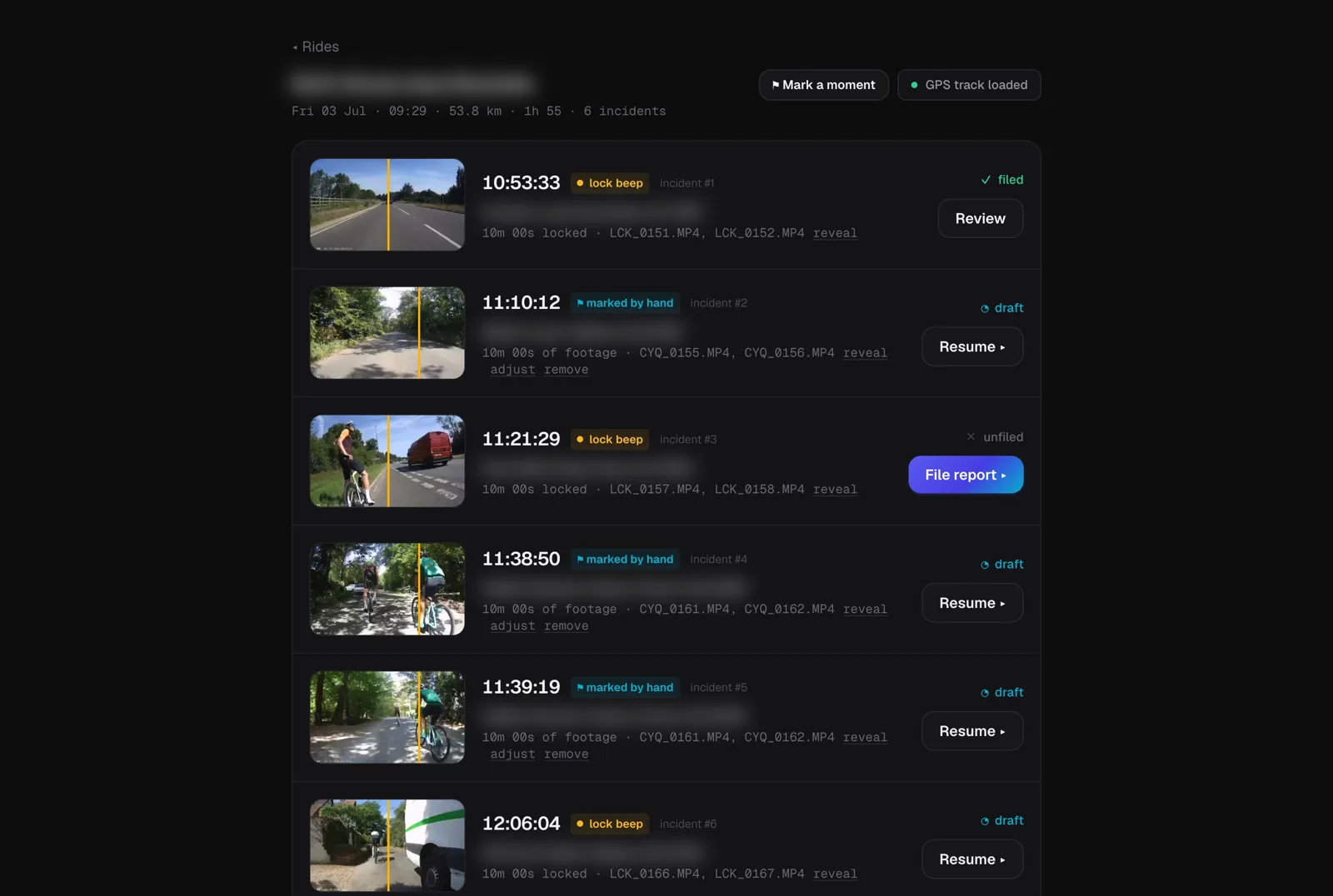
Report-It ride view listing six detected incidents with addresses, statuses and a File report button
A real ride. Six incidents found, pinned and ready to file.

// the problem

Reporting a close pass is the right thing to do.
The process feels like a punishment.

01

An evening of scrubbing

Your camera saves five-minute segments. The close pass is four seconds, somewhere inside two hours of them.

02

A form with 90+ fields

Exact location, time, direction of travel, registration, make, model, colour, and a formal written statement. Get one wrong and the report goes nowhere.

03

Then, silence

Reference numbers buried in email. A footage request three weeks later. Nothing lives in one place, so most people stop reporting.

// what report-it does

The whole job, one workbench

Find the moment in seconds

Locked your camera when it happened? Report-It hears the lock beep and takes you straight there. Didn't lock it? Mark a moment by hand and it does the rest.

The form fills itself

The plate is read from the footage, the location pinned from your ride, the statement drafted in the tone you choose. You check it, you don't type it.

Nothing slips through

Every report is logged with its police reference. When officers ask for the footage, you answer from the same app in two clicks.

// the tour

From SD card to case reference

Step 1 · Import

Plug in the card. That's the hard part done.

Report-It scans the SD card, matches the footage to your rides and surfaces the ones that need attention. Each ride shows its route, its incidents and exactly where you got to with each one.

  • Works with Cycliq Fly12 out of the box
  • Import a single ride or the whole card
  • Footage stays on your machine, always
Recent rides
Report-It home screen showing recent rides with route thumbnails, incident counts and a needs attention list

Step 2 · Find

Lock beeps become bookmarks

Every time you locked your camera mid-ride, Report-It hears the beep and marks the spot. Scrub a tight window around it, sweep at up to 8x, and set the exact frame the incident happened.

  • Lock-beep detection across the whole ride
  • Mark a moment by hand when you didn't beep
  • Frame-accurate scrubbing with a magnifier loupe
Mark the moment

Step 3 · Evidence

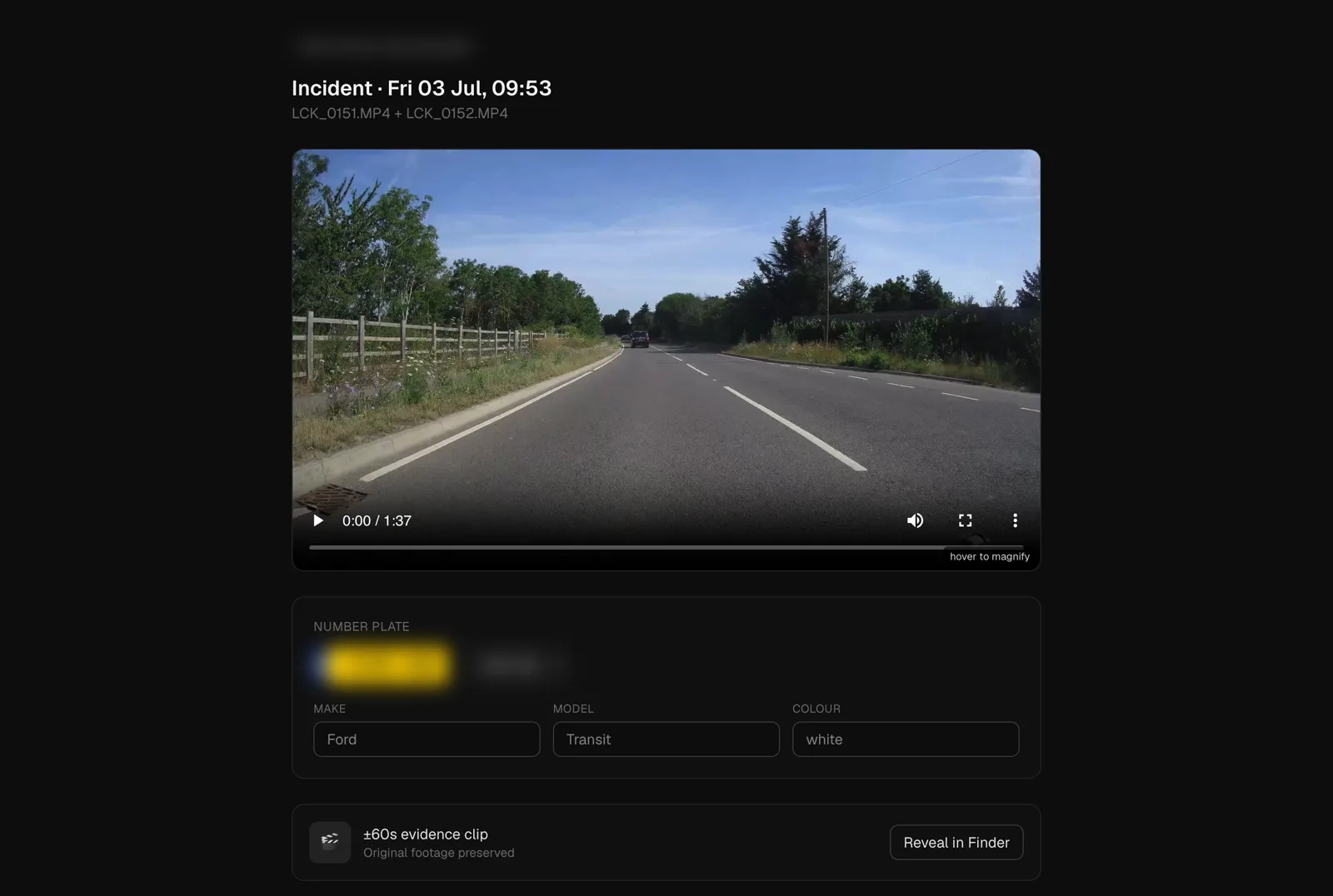
The plate reads itself

A detector finds the plate in frame after frame, reads every variant and votes on the best answer. While it works, a ±60 second evidence clip is cut for the police and the original footage is preserved untouched.

  • Plate OCR with cross-frame voting
  • ±60s evidence clip cut automatically
  • Hover-to-magnify for your own double check
Incident workbench
Incident workbench with footage player, the number plate read automatically into a UK plate chip, and vehicle details

Step 4 · Details

Pinned to the metre, rated for danger

Your ride's GPS pins the incident to the exact stretch of road, postcode included. Tap what happened, rate how dangerous it was, and the statement is written to match, up to and including asking for prosecution.

  • Location auto-pinned from your ride data
  • One-tap incident tags, no free-text staring
  • Danger rating shapes how forceful the statement is
Location and rating
Location pinned on a map with what-happened tags and a danger rating of ten with a prosecution note

Step 5 · File

The portal, handled

The Thames Valley Police online form is long. Report-It opens it inside the app and fills it from what it already knows: your details, the vehicle, the location, the statement. You review each page and press submit.

  • 90+ form fields filled for you
  • You stay in control, page by page
  • The case reference is captured the moment it appears

A few of the 90+ portal fields Report-It fills on your behalf.

Step 6 · Track

Filed, referenced, remembered

Every report lands in your log with its reference, danger rating and clip. When the police email asking for the footage, paste their link and Report-It matches it to the right report and attaches the clip for you.

  • Police references captured automatically
  • Footage requests answered in two clicks
  • Your whole reporting history, searchable
My reports
My reports log showing filed reports with police reference numbers, danger ratings and a footage sent confirmation

// how it works

Four steps, most of them yours already

  1. 1

    Ride

    Ride with your camera on, exactly as you do today. Lock it when something happens if you can.

  2. 2

    Import

    Back home, plug in the SD card. Report-It scans it and pairs the footage with your ride.

  3. 3

    Review

    Check the moment it found, confirm the plate, tap what happened, rate the danger.

  4. 4

    File

    Press report. The portal form fills itself, you approve it, and the reference is logged.

// pricing

Free while we're in early access

Founding rider

£0during early access

  • Every feature, no limits, while in beta
  • Founding price locked in when we launch
  • Your footage never leaves your machine
  • Cancel any time, keep your report log
Join the waitlist

// join

Next time it happens, be ready

Invites go out in small batches to keep the early feedback loop tight. Thames Valley first, other forces to follow.

No spam. One email when your invite is ready.

Join waitlist